WebAuthn: The Backbone of Modern Passkey Authentication
WebAuthn and FIDO2 are the open standards that make passkeys work across every browser and device. Learn how it works and what it means in practice.


Passkeys don't work by magic. When you authenticate with a fingerprint instead of a password, a precisely defined technical handshake happens between your device, your browser, and the website's server. That handshake is governed by two interlocking standards: WebAuthn and FIDO2. Together, they're the reason passkeys work consistently across browsers, operating systems, and devices — and why they're phishing-resistant by specification, not just by design intent.
This post explains what WebAuthn and FIDO2 are, how they interact, and why the standardisation they provide matters as much as the cryptography. If you want the cryptographic foundations first, start with The technology behind passkeys: PKI explained.
The Standards Problem WebAuthn Was Built to Solve
Before WebAuthn, the authentication landscape was fragmented. Hardware security keys existed, biometric sensors existed, and cryptographic authentication existed — but every vendor implemented it differently. A security key that worked with one service might not work with another. Developers had no consistent API to build against. Browsers had no standardised way to communicate with authenticators. The result was that stronger authentication methods stayed niche, while passwords — universally supported and requiring no special implementation — remained the default despite their weaknesses.
WebAuthn solved this by giving the web a single, standardised API for strong authentication. One implementation works everywhere the standard is supported, which today means every major browser and operating system.
What Is FIDO2?
FIDO2 is the overarching authentication standard developed by the FIDO Alliance — the industry consortium whose history we covered in The history and evolution of passkeys. It was released in 2018 and represents the culmination of the Alliance's work on replacing passwords with cryptographic authentication.
FIDO2 consists of two components:
- WebAuthn — the browser-facing API, developed jointly with the W3C, that websites use to request and verify passkey authentication
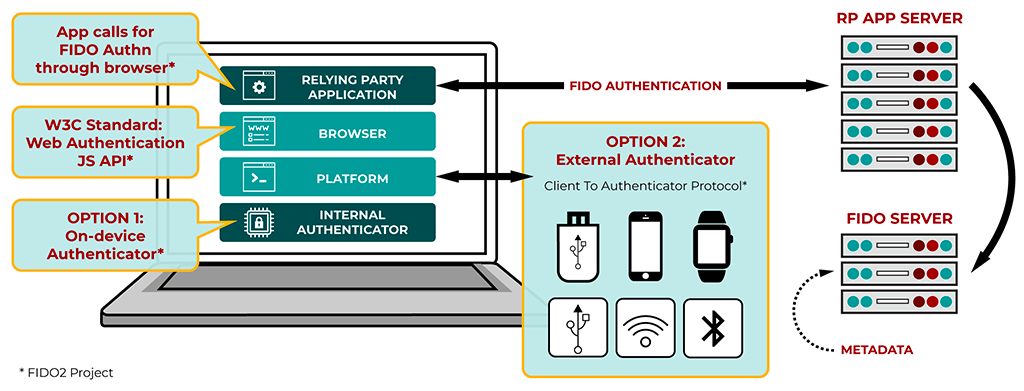
- CTAP2 (Client to Authenticator Protocol 2) — the protocol that governs communication between the browser and an authenticator, whether that's a built-in device sensor or an external security key
FIDO2 is the standard. WebAuthn is the part of that standard that web developers interact with. When people use the terms interchangeably, they're usually referring to WebAuthn specifically — the API that made passkeys practical for the web.
What is WebAuthn?
WebAuthn, short for Web Authentication, is a cutting-edge web standard jointly developed by the World Wide Web Consortium (W3C) and the FIDO Alliance. Launched in 2019, WebAuthn provides a secure, standardized, and password-free way for web applications to authenticate users. It's designed to work with a variety of authenticators, from built-in sensors on devices to external security keys.
In practical terms, WebAuthn is what a website calls when it wants to register a passkey or authenticate a user. The browser receives that call, communicates with the appropriate authenticator (your device's secure enclave, a hardware key, etc.), and returns the result. The website never interacts directly with your authenticator — WebAuthn is the standardised intermediary that makes the exchange possible and consistent.
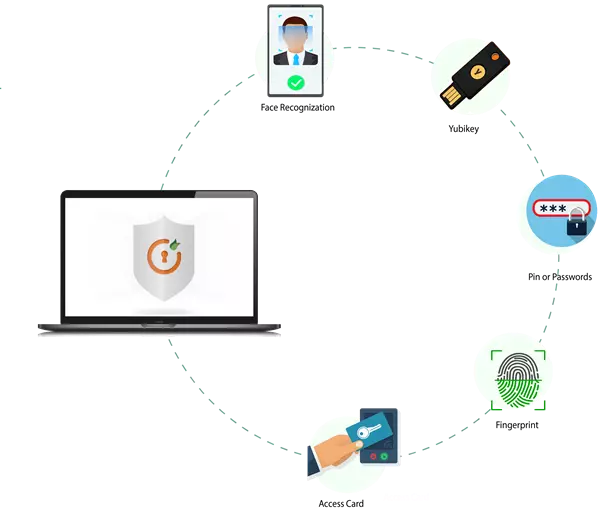
How WebAuthn Works: The Technical Flow
Registration (creating a passkey)
- You initiate account creation or passkey setup on a website
- The website's server generates a challenge — a random value — and sends it to the browser along with parameters specifying what kind of credential it will accept
- The browser calls the WebAuthn API:
navigator.credentials.create() - The browser communicates with your authenticator (secure enclave, TPM, or external key) via CTAP2
- The authenticator generates a public-private key pair specific to this website's origin
- The authenticator signs the challenge with the new private key, proving the key was generated in response to this specific request
- The browser returns the public key, a credential ID, and the signed attestation to the website
- The website stores the public key and credential ID against your account
The private key is generated inside the authenticator and never transmitted. The website receives only what it needs to verify future authentications.
Authentication (logging in)
- You initiate login on the website
- The server generates a new random challenge and sends it to the browser, along with the credential ID associated with your account
- The browser calls the WebAuthn API:
navigator.credentials.get() - Your device identifies the matching passkey and prompts for local verification — biometrics or PIN
- The authenticator signs the challenge with the private key
- The browser returns the signed assertion to the website
- The website verifies the signature using the stored public key — if valid, authentication succeeds
Each authentication produces a unique signature for a unique challenge. There is nothing replayable, nothing interceptable that could be reused, and nothing that reveals the private key.
The Origin Binding Mechanism
One of WebAuthn's most important security properties — and the one that makes passkeys phishing-resistant — is origin binding. When a passkey is created, the authenticator records the Relying Party ID: typically the domain of the website. This is cryptographically embedded in the credential.
During authentication, the browser automatically includes the current origin in the data sent to the authenticator. If the origin doesn't match the Relying Party ID recorded at registration, the authenticator refuses to sign. The authentication process doesn't fail — it simply never starts.
This is enforced at the browser and authenticator level, not the application level. A developer cannot override it. A phishing page cannot spoof it. It is a structural property of the specification itself — which is why we describe passkeys as phishing-resistant by specification in How passkeys enhance security and protect against phishing.
Authenticator Types: What WebAuthn Supports
WebAuthn is designed to work with a range of authenticator types, all accessed through the same API:
Platform authenticators are built into the device — Apple's Secure Enclave, Android's StrongBox, Windows Hello's TPM. These are what most users interact with when using passkeys today. They're convenient, always available, and hardware-backed.
Roaming authenticators are external devices — hardware security keys like YubiKeys — that connect via USB, NFC, or Bluetooth. They're portable across devices and don't require a platform authenticator. They're common in enterprise environments and among high-security users.
Both types communicate with the browser via CTAP2, and both are fully supported by WebAuthn. From the website's perspective, the authentication flow is identical regardless of which type is used.
Synced Passkeys and WebAuthn
The original WebAuthn specification was written primarily with device-bound credentials in mind — passkeys that exist on one device and don't leave it. The introduction of synced passkeys (credentials replicated across devices via iCloud Keychain, Google Password Manager, or similar) extended the model.
Synced passkeys still use WebAuthn for the browser-server authentication exchange. What changes is the underlying credential storage and sync layer, which is managed by the platform outside of WebAuthn itself. The website sees an identical authentication flow either way.
This distinction matters for security analysis — synced passkeys involve the platform's cloud infrastructure, while device-bound passkeys don't.
Why is WebAuthn Important for Passkeys?
- Standardization: WebAuthn provides a unified API that developers can implement across different platforms and browsers, ensuring consistency and interoperability.
- Security: By leveraging asymmetric cryptography, WebAuthn eliminates common vulnerabilities associated with passwords, such as weak or reused credentials.
- User Experience: WebAuthn seamlessly integrates with various authentication methods, including biometrics (fingerprint, facial recognition) and security keys, offering a frictionless user experience.
- Privacy: WebAuthn is designed with privacy in mind. Biometric data used for authentication never leaves the user's device, and each credential is unique to its associated website.
WebAuthn and FIDO2 are the reason passkeys can exist as a universal standard rather than a proprietary implementation. They define the authentication API that browsers expose, the protocol that authenticators implement, and the security properties — particularly origin binding — that make passkeys phishing-resistant by specification.
Without WebAuthn, passkeys would be a collection of incompatible vendor-specific solutions. With it, they're a consistent, interoperable authentication method that any website can implement and any modern device can use.