What Are Passkeys and How Do They Work?
Passkeys are a more secure and user-friendly alternative to traditional passwords, mitigating phishing risks and enhancing online security.

Passkeys offer a more secure and efficient way to authenticate online, providing faster and simpler access while significantly enhancing resistance to attacks. Rather than relying on a password you have to remember (and a hacker could steal), passkeys use cryptographic key pairs to verify your identity without ever exposing a shared secret.
What is a Passkey?
A passkey is a public key credential - a type of passwordless authentication built on the FIDO2 standard and enabled by a browser technology called WebAuthn. When you create an account using a passkey, your device generates a pair of cryptographic keys – one public and one private. The public key is sent to the server, while the private key remains securely stored on your device. During the login process, the server sends a unique challenge that your device must sign using the private key. This interaction verifies your identity without exposing any sensitive information, as the private key never leaves your device.
How Does Passkey Authentication Work?
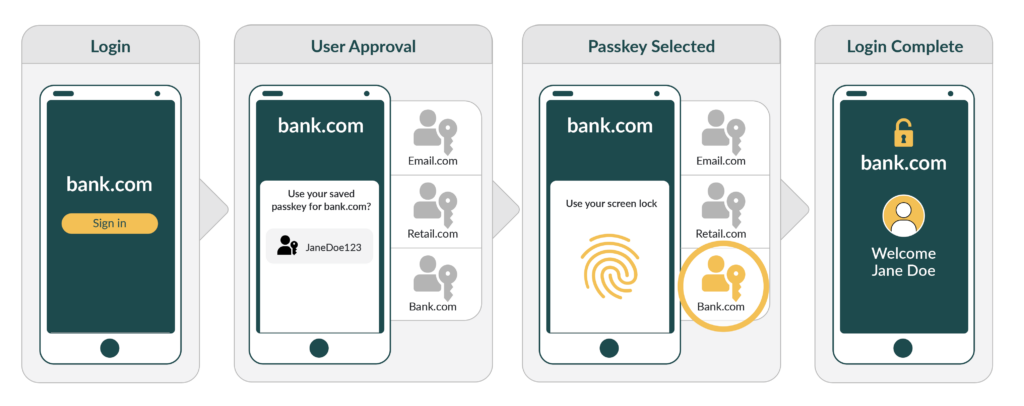
After the initial account setup, the user simply needs to unlock their device – using biometrics such as fingerprint recognition or facial recognition, for instance – to facilitate the login process. This unlocking enables the private key to sign the challenge from the server, thereby authenticating the user's identity. Let's look at the authentication flow in more detail:
- You visit a website and initiate sign-in
- The server sends a cryptographic challenge to your device
- Your device prompts you to verify your identity — typically via biometrics like Face ID, Touch ID, or a fingerprint scanner
- Your device signs the challenge with your private key
- The signed response is sent back to the server, which verifies it using your public key
- Access is granted — no password required
By utilising asymmetric cryptography with a private key stored securely on the device and a public key validating identity requests on the server, passkeys substantially improve security. There are no shared secrets that could be intercepted or stolen by malicious actors.
Why Are Passkeys More Secure Than Passwords?
Passkeys eliminate several of the most common attack vectors that make passwords vulnerable:
- Phishing resistance: Passkeys are cryptographically bound to the specific website they were created for. Even if an attacker tricks you into visiting a fake site, your passkey simply won't work there — it won't respond to a challenge from an unrecognised origin
- No server-side secrets: Because only the public key is stored on the server, a data breach at the website exposes nothing useful to an attacker
- No credential stuffing: Without a reusable password, there's nothing to stuff. Stolen credentials from one breach can't be tried across other sites
- No weak passwords: The cryptographic keys are generated by your device and are inherently strong — human-chosen password weakness is removed from the equation entirely
Where Are Passkeys Supported?
Passkey support has grown rapidly. Apple, Google, and Microsoft all support passkeys across their platforms and browsers — meaning passkey login is available today on iOS, Android, macOS, Windows, Chrome, Safari, and Edge. Major services including Google, Apple, PayPal, and GitHub have already rolled out passkey authentication for their users.
Frequently Asked Questions
- Are passkeys safe if someone steals my phone? Yes. The private key is protected by your device's secure enclave and can only be used after you authenticate — via biometrics or your device PIN. A thief with your phone still cannot access your accounts without your fingerprint or face.
- What happens if I lose my device? Passkeys can be synced across your devices through your platform's credential manager (iCloud Keychain, Google Password Manager, etc.), so losing one device doesn't mean losing access. We cover device loss and account recovery in detail in our dedicated guide.
- Do passkeys replace two-factor authentication (2FA)? Passkeys combine a device-stored private key (something you have) with biometric verification (something you are), delivering built-in multi-factor authentication. We explore how passkeys compare to traditional 2FA in a separate post.
- Can I use passkeys on every website? Not yet — adoption is growing but not universal. We track the current state of passkey support across major platforms and services in our adoption overview.
The Bottom Line
Passkeys are a groundbreaking shift in online authentication, offering faster, phishing-resistant, and more secure login experiences. They are faster to use than passwords, immune to phishing, and eliminate the server-side risks that make data breaches so damaging. The underlying technology — FIDO2, WebAuthn, and asymmetric cryptography — is mature, standardised, and already supported by all major platforms.